




Amid rising caseloads and new technologies, managing client cases effectively is an increasing challenge in offering human services. Modern case management software now offers many capabilities and features that can uniquely support your organization. Functionalities such as workflow automation and integration with messaging tools can boost your communication, service quality, operational efficiency, and client experiences. But every platform’s abilities vary.
The case management system features you prioritize will depend on your organization’s unique needs and mission goals. Explore the top 10 key features of case management systems to consider when adopting new solutions.
How Case Management Systems Streamline Processes in Human Services
Nonprofit case management systems such as Casebook simplify and accelerate management processes by automating tasks, facilitating communication, and providing real-time updates. These features have become a crucial aspect of nonprofit organizations’ daily service delivery. You can provide faster, higher-quality outcomes by simplifying clients’ responsibilities, increasing staff efficiency, and allowing workers to focus on case details.
Case management system features are important for completing and automating many social work tasks, including:
- Compiling and filing case data
- Double-entering clients’ forms
- Creating customized forms and paperwork
- Checking insurance and licensing progress
- Scheduling appointments and service requests
- Sending appointment reminders
- Identifying entry errors
As you explore case management software options, research the depth and capabilities of each platform’s features. Understanding feature depth is essential for managing complex, high-volume programs, as you’ll need to tailor your system and client portal to your organization’s unique workflow.
1. Configurable and Scalable Systems
Flexibility is essential when adopting tools for human services. Your organization’s programs, compliance requirements, operational capabilities, and community needs may change frequently in this fast-paced, unpredictable industry.
Case management systems that are configurable to specific needs or preferences let you personalize your workflows, forms, and fields without custom development. This level of customization will help you maintain your existing workflows and easily adapt to whatever the future may hold.
You must also consider your platform’s scalability and its ability to grow with the rest of your organization. The best case management software should allow you to:
- Take on more cases and clients without issues
- Support more users and data over time
- Add new programs or services that your community may need
- Evolve your operational capabilities without replacing your entire system
2. Centralized Records and Data
Storing records across multiple systems, servers, and devices can result in key information being siloed or overlooked, impairing your data accuracy and decision-making. Centralizing your records in a secure, user-accessible system is crucial for effective case management, whether you’re managing client-level or program-level data.
Centralized client records support various aspects of case management, including:
- Continuity of care: Keeping records all in one place ensures you can quickly review all relevant information before client encounters.
- Accuracy: Many systems automatically review documents and alert you to errors or discrepancies to keep your records and insights reliable.
- Cross-team collaboration: Case management tools let you securely share key client information with other care providers, such as doctors, therapists, law firms, and specialists, while letting them share data, too.
- Reduced duplication of work: Automating documentation, note-taking tasks, and other tasks with artificial intelligence (AI) maximizes your available work hours and the number of clients case managers can see. Automation also reduces the risk of human error when double-entering client records.
- Avoid data siloes: Centralized records stop data siloing to keep your insights as accurate and comprehensive as possible.
3. Structured Intake and Assessment Workflows
Your client intake and assessment processes will significantly define the rest of your case and treatment plan. Intake is a vital opportunity to learn about clients’ needs, goals, and circumstances. Establishing a consistent intake process using customized forms and case management software simplifies documentation and note-taking. Case managers can focus fully on client conversations while still capturing all key data, including:
- Personal and demographic information
- Contact information
- Service history
- Needs, goals, and preferences
The best case management systems offer configurable assessment and intake forms and workflows. These let you tailor your processes to the unique needs of each client and program. By streamlining your client onboarding, you can deliver services faster to those who need them. Consistent note-taking can also make your data more reliable from the start of every case, improving decision-making and service quality.
Additionally, with automated workflows, you can seamlessly migrate a client’s records to their current case using all available referral documents. Plus, any digital forms or intake notes completed during the process automatically integrate within the case file for easy access later.
4. Real-Time Updates and Workflow Automation
With workflow automation, you can now complete forms digitally and then automatically add them to the client’s file, significantly reducing administrative burden. This improves efficiency and peace of mind, reducing staff responsibilities and the risk of overlooking steps. With more time in their workday, case workers may take on more cases, give their clients more attention, or reclaim the 15-minute breaks that had gradually been replaced by paperwork.
Casebook and other tools also automatically update tasks, documents, licensing, and case progress in real time. The tools notify case managers as soon as tasks are completed, such as when clients submit forms or an insurance provider sends approval. This enables workers to move to a case’s next tasks as soon as they’re ready. Real-time case updates also keep teams aligned across programs, allowing case workers to share important client details with providers.
Automation features now support various aspects of case management, including:
- Appointment and task reminders
- Status changes
- Progress visibility
- Scheduling
- Deadline alerts
- Enforcement of next steps and case requirements
5. Secure and Compliant Document Management
Managing data is arguably the most essential duty of case management systems, enabling caseworkers to access intake notes, client details, and other files with ease. However, the system’s data management features must include secure storage with thorough cybersecurity to protect clients’ personal data.
Clients share their family details, Social Security numbers, and other confidential information through the management process. When misused or accessed due to inadequate cybersecurity, this data could pose financial and safety risks to clients. Additionally, mishandled data violates the Health Insurance Portability and Accountability Act (HIPAA) and the Family Educational Rights and Privacy Act (FERPA).
Casebook’s case management software features utilize a three-tier security model that strengthens its applications, cloud storage, and access controls. These multiple layers keep clients’ data dependably protected from cyberattackers and ensure you stay compliant with HIPAA, FERPA, and other confidentiality standards.
Your case management software should also support version control and role-based access to documents. These limit who can access sensitive information while still letting approved parties quickly access all relevant data and version histories as needed. Secure and comprehensive document management is also crucial for audit readiness and documentation integrity, giving you a tangible paper trail of your cash flow, services, and data-handling.
6. Client Communication and Engagement Tools
Consistent communication with clients is critical for follow-through, participation, and effective outcomes. Effective communication can answer clients’ questions, ease concerns, establish clear expectations, and give clients more control over their progress.
By combining all messaging and scheduling into a single platform, management tools with secure, system-based communication channels simplify case processes for both clients and workers. Platforms such as Casebook let clients ask questions, reschedule appointments, and submit documents all from a single, user-friendly client portal. Plus, they can select their preferred contact method, such as phone calls or emails, for more efficient communications.
For caseworkers, integrated communication helps when reviewing case management plans. Instead of filtering through email and text inboxes, you can find all of a client’s messages and appointment notes within one interface. The Casebook app will even notify you about new messages and case updates based on your user settings. This supports responsiveness and engagement, ensuring no messages are missed and that all parties can go and check previous communication threads.
7. Reporting, Analytics, and Data Visibility
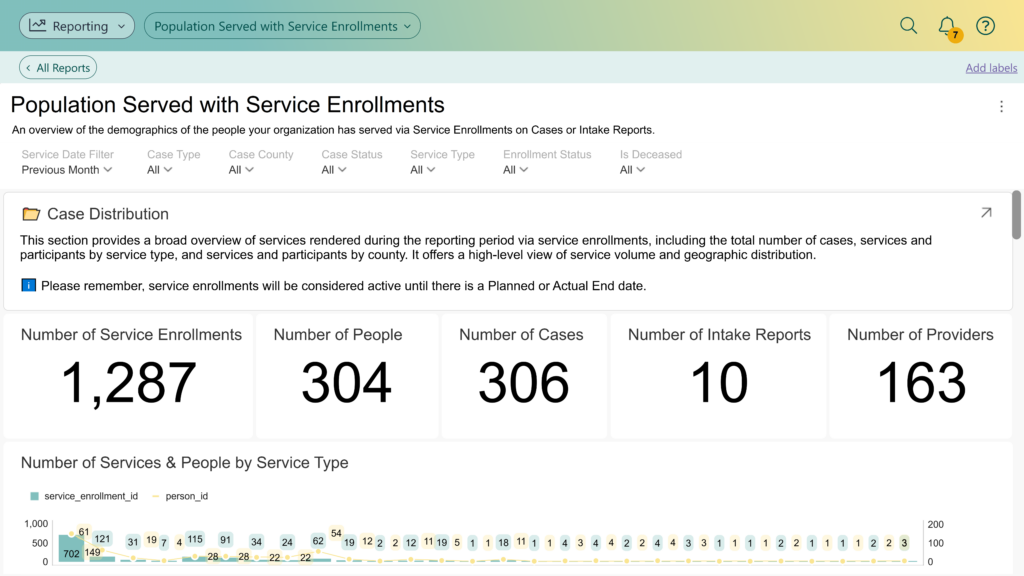
Reporting and analytics are key case management system features that help you understand both operations and outcomes. Dashboards, customizable reports, and other reporting features support your team as you develop tailored resolutions and care plans around each client’s unique needs.
The key benefits of virtual case management reporting features include:
- Identifying trends: AI-powered analytics tools track data patterns to identify trends and predict future case management needs.
- Boosting accuracy: Advanced case management analytics can help you avoid bias and human error when analyzing data.
- Supporting program improvements: Impact assessments provide crucial insights as you refine your services and programs over time, optimizing your budget and service quality.
- Informing leadership decisions: Predictive analytics, digestible reports, and detailed client insights help you make the most informed decision possible, ensuring you don’t overlook any key considerations or variables.
- Elevating grant engagement: Advanced case management tools support reporting for grant engagement so you can maintain compliance and potentially expand your future funding opportunities.
8. Integration With Other Systems
Your case management system should reliably integrate with other third-party tools, such as:
- Email accounts
- Digital calendars
- Video conference platforms
- Customer relationship management (CRM) platforms
- Human resources (HR) software
- Billing and financial software
- Time-tracking software
- Cloud and data storage tools
These integration features establish your case management dashboard as the ultimate all-in-one interface for your workflow. Stay up to date with client communication, case progress, and every other step of your treatment plan without having to check multiple apps.
System-wide integrations reduce the risk of siloed data and manual data entry errors, improving data accuracy and consistency. This level of automation also supports operational efficiency, as case managers can complete all the work within a single platform without missing essential steps.
9. Mobile Accessibility for Field and Remote Work
Case management often requires managers and social workers to work away from their desks, whether they’re conducting home visits or advocating at the community level. Many case management systems now offer mobile apps and other remote accessibility solutions, letting you easily access and update case information while on the go.
An efficient, mobile-friendly data management system is especially vital in remote, hybrid, and distributed work environments. You can support field staff and case managers working outside of traditional offices while still keeping all operations on the same platform.
Letting field workers choose which device they can work from, rather than restricting all documentation to a specific computer, can also improve timeliness and accuracy. Case managers can more easily complete case notes immediately after every client interaction, reducing the risk of forgetting key client behaviors or details.
Additionally, letting case managers update case notes from practically anywhere gives them more control over their ideal work environments. Dedicated workers can establish the atmosphere and workflows that work best for them, letting them avoid distractions and focus solely on the task at hand. Mobile accessibility also simplifies leadership oversight by making all applicable case details readily available during team evaluations.
10. Intuitive User Interface
Extensive case management system features won’t help your organization if your staff doesn’t know how to use them. Your case management solutions should be user-friendly and intuitive to support adoption, consistency, and productivity.
The program’s interface should comprehensively communicate all essential information to all parties, from case managers’ next steps to clients’ next appointments. The interface should also simplify case managers’ workflows, such as by compiling all relevant case details for visit prep.
Easy-to-navigate systems can reduce training time, raising staff satisfaction and your system’s return on investment (ROI). On the client’s side, the platform should be digestible and easy to use so they can schedule appointments, complete documents, and add signatures without technical support.
Case management software features that improve the user’s experience include:
- Accessible client portals
- Clean and organized dashboard designs
- Displays with high-level data and case progress insights
- Streamlined navigation
- Easy access to training and support resources for your team
Access These Core Case Management Features With Casebook
The right case management system features can support your operational efficiency, care coordination, brand visibility, and real-world impact. As you browse case management solutions, research each tool’s unique features and capabilities and how they can benefit your specific organization.
Casebook’s case management platform supports efficiency, coordination, and other crucial outcomes through integrated functionality. Book a demo or get in touch today to learn more.